Feed Crystalfontz [copy] https://www.crystalfontz.com/blog/feed/ has loading error: cURL error 22: The requested URL returned error: 403
Feed linux for devices [copy] http://www.linuxfordevices.com/rss-feeds-1.xml has loading error: cURL error 22: The requested URL returned error: 404
Feed marsohod.org [copy] https://marsohod.org/component/ninjarsssyndicator/?feed_id=1&format=raw has loading error: cURL error 22: The requested URL returned error: 500
Feed SparkFun Electronics [copy] http://www.sparkfun.com/feeds/news has loading error: cURL error 22: The requested URL returned error: 405
Feed Technoblogy [copy] http://www.technoblogy.com/rss?KVM+3 has loading error: cURL error 22: The requested URL returned error: 503 Service Unavailable
Debugging Ubiquiti's 5G Backup on AT&T

For a mobile 'mini homelab' project I'm working on, I wanted to use 5G Internet as a primary 'on-to-go' connection, but still have the ability to plug in another Internet connection when I put the mobile rack I'm building in a fixed location.
I'll have more on that project soon, but I figured this project was a good way to check out Ubiquiti's solutions, especially considering many of their smaller gear fits nicely within the dimensions of a mini rack (the 3U DeskPi RackMate TT is pictured above).
OpenTitan project kicks off the Peppermint integrated root-of-trust for area-constrained SoCs
...
Getting the Steam Deck LCD working on a Raspberry Pi

The BOE TV070WXM-TV0 LCD used in the original Steam Deck can be had for around $30. It's a serviceable 7" touchscreen with 400 nits of brightness and a resolution of 1280x800 (for a sharp 216 ppi).
The specs are a lot nicer than the Pi 7" Touch Display, which costs twice as much, with giant bezels and half the resolution!
Until today, the Steam Deck LCD didn't work with a Raspberry Pi. But the folks at Scandent were trying to standardize on a mass-market touchscreen for one of their own devices, and built a Linux kernel driver for it which they intend...
Hands-on with Raspberry Pi's CM5 Programming Jig

In the before-times, when Raspberry Pi CM5s were (relatively) affordable, I built a number of Pi clusters (example), and one of the most annoying parts of the build was flashing Raspberry Pi OS to all the Pis.
One, two, or even three Pis isn't a big deal, but once you hit 4+, the process of plugging the Compute Module into a carrier board, plugging that into a computer, managing Raspberry Pi Imager, and trying to match up details like a hostname, MAC address, and the physical Pi itself, gets annoying.
Модернизация сложной стеклодувной пушки. Фотоотчёт

Настольная горелка — основной инструмент стеклодува, будь то упрощённое изготовление стеклянных сувениров или сложное приборостроение. От конструкции и исполнения стеклодувной горелки зависят возможности мастера, безопасность и удобство его ежедневной работы. Работы, как правило, тонкой и кропотливой. Известна горелка «пушка» — эволюционировавшая паяльная трубка, по схеме которой могут быть построены и крупные мощные «мортиры», и крохотные ручные огни для мелкой пайки стекла. Небольшую пушку для стеклодувных экзерсисов, например, для изготовления химических принадлежностей и некрупной посуды, нетрудно собрать и отрегулировать в полчаса из подручного хлама, однако, гораздо лучше горелки, построенные вдумчиво и основательно, в том числе и с оперативной регулировкой формы и размера...
Fritzing 1.0.8 released
Fritzing 1.0.8 speeds up everyday editing: you can edit many parts at once, part locking finally behaves, and a marker points at the exact part that has a problem. The release also brings a native Linux build for the Raspberry Pi and other ARM boards. And Fritzing can now deliver corrected parts into your existing sketches safely. We tested it on macOS 26 Tahoe, Windows 11, Ubuntu 22.04, Ubuntu 24.04, and Raspberry Pi OS Trixie. What’s New Multi-Selection Editing You can now select several parts and edit them together in the Inspector. It shows the values the parts have in...
I'm excited for Intel after testing the XPS 13

Shortly after Apple launched the budget MacBook Neo, Dell announced their response, a new low-end XPS 13.
Matching the Neo's current pricing, it starts at $699, or $599 with an educational discount. That discount is currently set to expire on November 2, and with the current component pricing insanity, I'd be surprised if we don't see a price increase on both laptops by next year.
I ran the XPS 13 through my gauntlet of benchmarks, and published a review on my YouTube channel:
Как измерить вакуум в лампе?

Теперь, воробьи уже стрелянные, мы знаем, как непросто обеспечить необходимый для длительной и нормальной работы (самодельной) лампы высокий вакуум — в котором склонны испаряться даже металлы, в них же обнаруживаются и выбираются наружу впитанные ранее газы [1] и даже предательское стекло, инертнейший, казалось бы, материал, содержит и испаряет газы и воду. Все эти ужасы можно не прекратить, но сократить до приемлемого уровня тщательнейшей очисткой и сложной подготовкой материалов, их вдумчивым подбором и применением постоянно действующего в электровакуумном приборе (ЭВП) микронасоса — геттера. То есть, вакуумную приёмно-усилительную лампу невозможно сильно откачать раз и навсегда — внутри её баллона при нужном разрежении устанавливается некое равновесие поступающих и поглощающихся газов,...
Proxmox officially supports Arm, with some caveats

Proxmox today announced their Proxmox Virtual Environment is now available for 64-bit ARM.
I tested it on my Ampere Altra Dev Platform—the same machine on which I've booted Windows on Arm the first time, messed with multiple GPUs, and most recently tested Houdini's native arm64 support.
Install was easy, as the Ampere Altra uses UEFI / ACPI for its hardware, meaning Proxmox didn't have to tailor its ISO to specific platforms, like you have to do with Raspberry Pis and most SBCs using a Device Tree setup.
Energizing a vacuum-tube flip-flop module from a 1948 IBM system
https://invidious.privacyredirect.com/watch?v=KaAv1yJ30PU
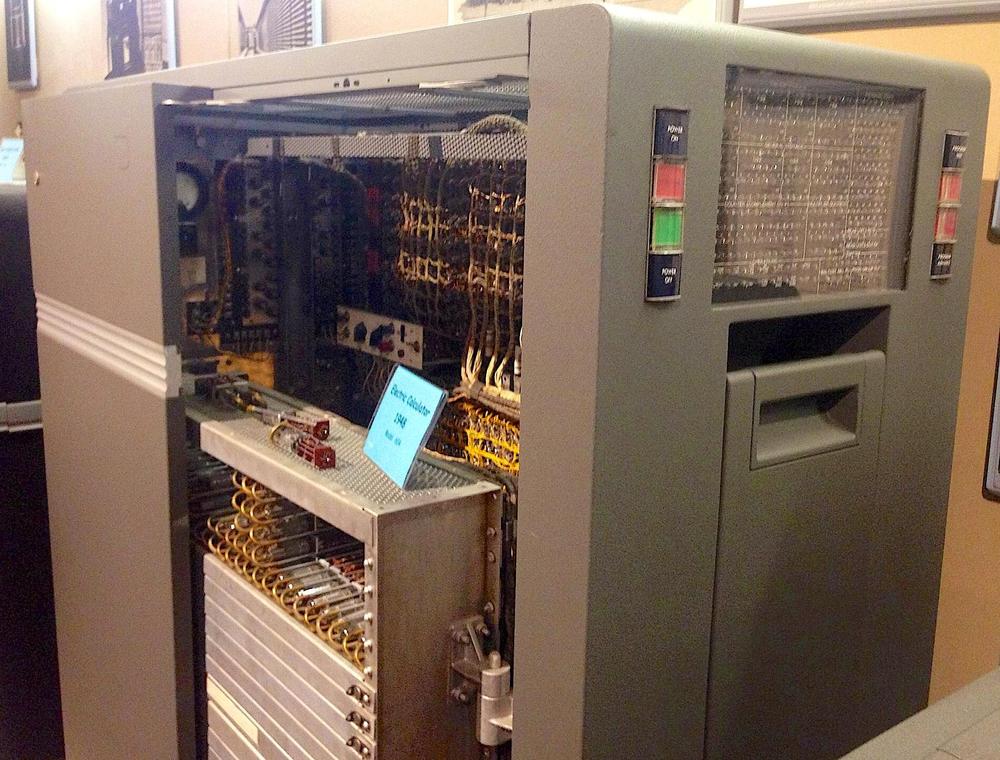
In 1948, IBM introduced the 604 Electronic Calculating Punch. This machine was a programmable calculator, about the size of a double refrigerator. It was not quite a computer, but was programmed by plugging wires into a plugboard. This machine read numbers from a punch card, performed up to 60 calculations on these numbers, and then recorded the results by punching holes in the card.1 It processed 100 cards per minute—over one card per second—and IBM advertised it as the equivalent of 150 engineers. The machine rented for $550 a month, making it very popular, with over 5600 units produced.2
The IBM 604 Electronic Calculating Punch. Photo from Ed...