Feed Cem TEZCAN [copy] https://yewtu.be/feed/channel/UCGcjzzEmGThh35eeDkvydeg has loading error: A feed could not be found at `https://yewtu.be/feed/channel/UCGcjzzEmGThh35eeDkvydeg`; the status code is `200` and content-type is `text/html`
Feed designboom magazine [copy] http://shalnoff.co.uk/rss.php?rss=designboom has loading error: cURL error 22: The requested URL returned error: 403 Forbidden
Feed formalista.ru [copy] http://feeds.feedburner.com/Formalista?format=xml has loading error: http://feeds.feedburner.com/Formalista?format=xml is invalid XML, likely due to invalid characters. XML error: > required at line 12, column 61
Feed Kinote.info [copy] http://kinote.info/sections/blog/articles.xml has loading error: https://kinote.info/sections/blog/articles.xml is invalid XML, likely due to invalid characters. XML error: Invalid document end at line 1031, column 7
Release of Data Origami Library 0.006

The Data Origami Library for Blender 2.49a has been updated. This library's goal is to reduce the number of lines of python required to generate a useful image, animation, or game in Blender.
In this release, the image class now supports the following methods:
Orienting the camera by using a lookAt and lookFrom locationAdding Blocks defined by opposing cornersAdding Cylinders defined by end locationsAdding SpheresAdding Text boxesAdding Lighting which can be aimed at a targetAdding Tubes which can be used to draw arbitrary curves from either piecewise lines or smooth curves.The library can be downloaded here. To install, simply unzip...
 dataorigami.blogspot.co.uk
Script to find the type of each object in a Blender scene
This examples applies to Blender 2.49 and some earlier versions.
import Blender
from Blender import *
scn = Scene.GetCurrent()
obs = scn.objects
for ob in obs:
    print 'Object named %s has type %s' % (ob.name,ob.type)
dataorigami.blogspot.co.uk
Portable Blender and Notepad++
One of the problems I have in my system is that I use PythonXY. PythonXY works best when it is the only registered Python on a system. The problem arises when installing Blender and PythonXY and both require different versions of Python. Blender Portable offers a way to solve this problem. Blender Portable installs a local copy of Python which can be different from any other Python installations on a machine. This portable version of Blender can still be used with Notepad++. To setup Notepad++, follow the instructions here, but use the following string to call Blender. "C:\PortableApps\BlenderPortable\blenderportable.exe" -P "$(FULL_CURRENT_PATH)"
dataorigami.blogspot.co.uk
Release of Data Origami Library 0.002

The Data Origami Library has been updated. The image class now supports the following objects: Orienting the camera by using a lookAt and lookFrom location Blocks defined by opposing corners Cylinders defined by end locations Spheres Text boxes
An issue with shading was corrected. The library now generates shadows correctly.
The library can be downloaded here.
The image above was generated by the test script here.
dataorigami.blogspot.co.uk
Interesting Dataset: BLS Time Use Survey
This is an interesting dataset which explains how people use their time in the US: BLS Time Use Survey.
dataorigami.blogspot.co.uk
The 0.001 Release of the Data Origami Library for Blender
This is a shell that will be expended in the future. It simplifies the problem of setting up an image in Blender. Other postings will build examples on top of this module.
For now, it is recommended to place this file in C:\tmp. I'll use that location in example scripts. A future release will have a more permanent recommended home.
Code:
Download Code for the Origami Library 0.001.
This file can be placed arbitrarily. Any script which imports this module must reference it by the full path because of how Blender handles files.
#!BPY __doc__ = """ OLib_xxxx.py Rev 0.001 This module setups up a scene for...Posted at 2009-08-03 05:50:00 | Art_and_design | read on
Using Blender Subsurfaces from Python
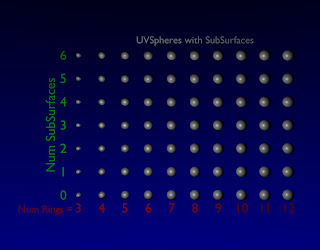
In Blender, one of the ways to improve the smoothness of an object is to use subsurfaces. Programatically, this is done by changing the modifiers attached to an object. In this example, a UVsphere is modified by changing the number of rings and segments. The same basic UVsphere is also modified by adding subsurface levels. From looking at the table, it is possible to see how increasing subsurface level and rings/segments both get a smooth looking sphere.
To get this example to run, you will need to copy the Data Origami Library rev 0.001 to C:\tmp (or modify the path to...
dataorigami.blogspot.co.uk
Interesting Travel Dataset

I was looking at NavIt, an open source mapping and routing package. They use the Open Street Map for one source database. The interesting thing buried in the Open Street Map project is over a quarter of a million XML source data traces which includes location and time stamps uploaded by users.
dataorigami.blogspot.co.uk
Interesting Dataset: Residential Energy Consumption Survey
This is an interesting dataset which illustrates the energy usage in US households annually. 2005 Residential Energy Consumption Suvey
dataorigami.blogspot.co.uk
How to draw a curve in Blender using Python - A Quick-N-Dirty Example
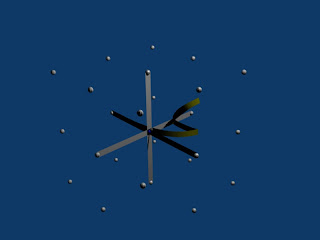
In a previous example, curves were generated using cylinder and spheres. This is computationally expensive and does not fully leverage Blender's capabilities. Rather than building curves using primitive meshes, the Blender.Curve objects can be used. This example demonstrates a simple script which creates a curve in 3D using Blender curves.
Code:
Download Code
#!BPY __doc__ = """ curveTest_xxxx.py Rev 1.0 The purpose of this script is to demonstrate the use of blender curves. This script is executed at the command line by: >blender -P curveTest_xxxx.py """ __author__ = "edt" __version__ = "1.0 2009/07/19" __url__="Website, dataOrigami.blogspot.com" ############################################################## # load the modules used in the script from Blender import Curve, Object, Scene from Blender.Scene import Render from...Posted at 2009-07-19 14:47:00 | Art_and_design | read on